Get it done, see where the time went.

Goalkite is a free task tracker for teams. Assign work together, schedule meetings, and see who spends how much time on what.

No credit card. Web, Windows, Mac and Android.

A screen from Goalkite

Goalkite board view: tasks in the Backlog, To do, In progress, In review and Done columns, with attendees, meetings and a running timer

Who took it, when it's due, how many steps are left, who is working right now: all at a glance.

Get started in three steps

  1. Create your account

    With your email and a password. You get a personal space and a team space.

  2. Invite your team

    Copy the invite link from Settings and send it to your team. Anyone who opens it joins your team automatically.

  3. Add your first task

    Write a task or schedule a meeting. The timer, notifications and calendar work right away.

Start for freeHow does it work?

The team works together, nothing slips through

Whoever opens a task, takes it on or comments on it is in the same place. No more asking who is on what or when something will be done.

Meetings, with their time and link

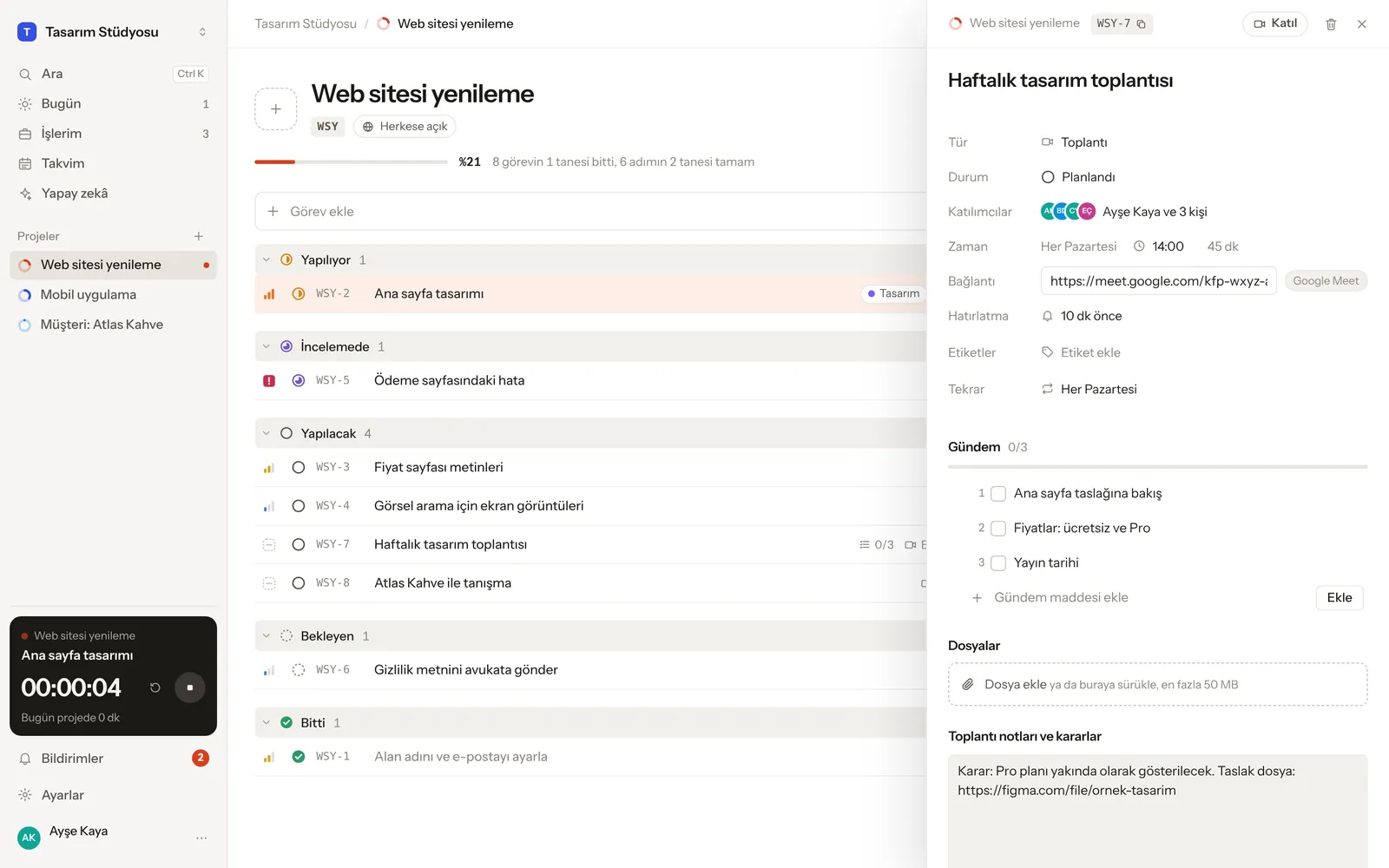
Turn a task into a meeting: add the time, the Google Meet, Zoom or Teams link, and the attendees. Everyone gets a notification 10 minutes before; tapping Join takes you into the call. The agenda and decisions stay in one place.
Assign one task to several people

If two or three people work on something together, assign them all. Everyone assigned sees the task in their own list and hears about comments and the due date.

Talk under the task, call people in with @

Every task has comments and a change history underneath. Type @ and pick a teammate; they get notified instantly, even with their phone locked.

Plan on the calendar, drag to reschedule

Dated tasks, meetings and routines in a month view. Drag a task to another day; everyone on the team sees the same plan.

Time tracking

Move a task to "In progress" and the timer starts; start it on your phone and stop it on your computer. Set a daily time goal for projects.

Routines

Every day, weekdays, certain days of the week or the 15th of every month. A routine only shows up on the days it's due.

Smart notifications

Comments that arrive in a row are bundled into one notification; turn off any kind you don't want with one tap.

Works offline too

When the internet drops, changes wait and are sent automatically once you're back online.

Easy to switch

Import your tasks from Jira, Linear, Asana, ClickUp, Notion or CSV.

Four languages

Interface, notifications, dates and times in English, Turkish, Russian or Azerbaijani; everyone picks their own. Light and dark theme.

The same on computer and phone

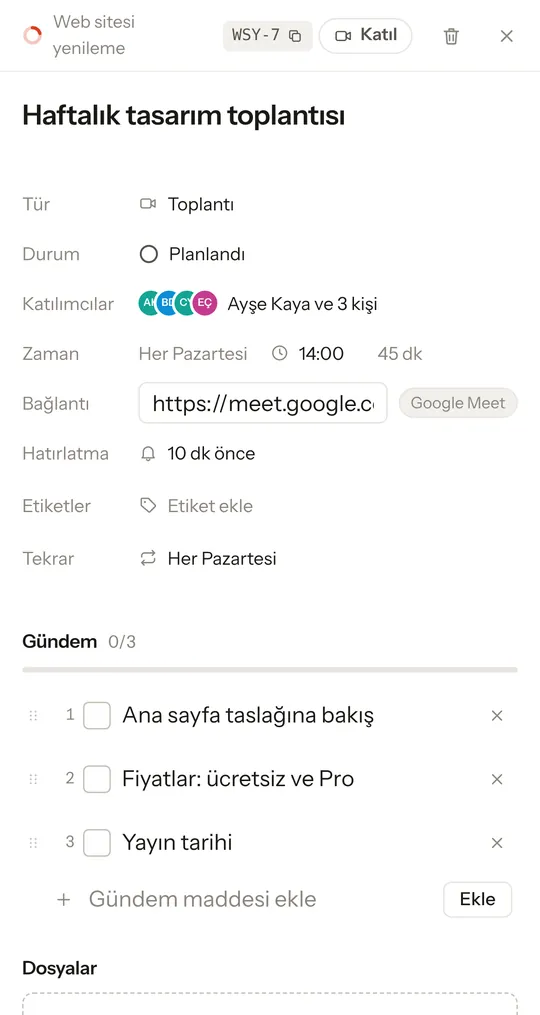
A meeting you open on your computer is ready on your phone too. When it's time, tap Join; the agenda and notes are right there.

Goalkite meeting panel: a 45-minute design meeting every Monday at 14:00, a Google Meet link, four attendees, a reminder 10 minutes before, and agenda items
Goalkite on a phone: the meeting's Join button, attendees, time and agenda
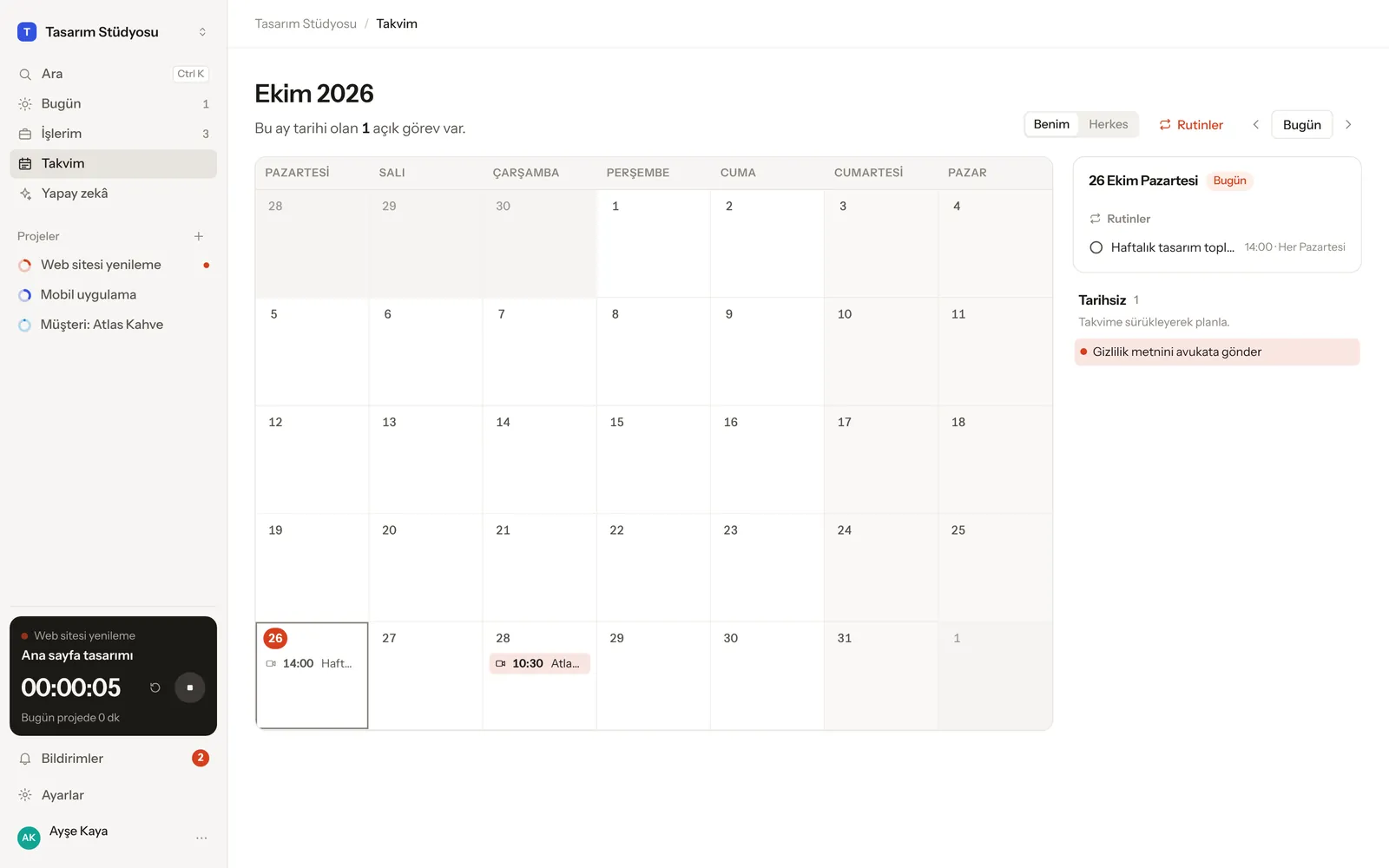
Goalkite calendar: meetings with their times in the month view, the selected day's agenda, and undated tasks
Browser Windows Mac Android and iPhone (add to home screen)

See download options

Who it's for

Teams and agencies

Keep client work in separate projects, assign tasks to teammates, and keep weekly meetings and decisions in one place. Time entries show who spent how long on what.

Freelancers

Track the time you spend on every job, never miss a due date, and schedule client calls with their time and link. A timer started on your phone keeps running on your computer.

Personal goals

Set up routines like reading, exercise or language practice; Goalkite counts how many days in a row you kept at it. Only you can see your personal space.

Pricing

Goalkite is free for everyone right now. Pro for growing teams is coming soon.

Free

$0forever
  • Unlimited projects, tasks and routines
  • Team, comments, @mentions and notifications
  • Time tracking and calendar
  • Web, Windows, Mac and Android
  • AI assistant with your own key
Start for free

Pro

Coming soon
  • Team and time reports, export
  • Tasks created from meeting notes
  • AI with no key needed
  • Priority support

When Pro launches, everything in your free account stays where it is.

Frequently asked questions

Is Goalkite really free?

Yes. Every feature is free today and we don't ask for a credit card. The upcoming Pro plan will add extras such as reports and AI; the features in the free plan will stay free.

Do I need to install anything?

No. You can use it in your browser at app.goalkite.com. Add it to your phone's home screen and it opens like an app. You can also download the Windows, Mac or Android app if you like.

How do I keep track of meetings?

When adding a task, choose Meeting; enter its time, length, the Google Meet, Zoom or Teams link, and the attendees. Attendees are notified 10 minutes before, and the Join button opens the call. Your notes and decisions stay in the same place.

Can a task be assigned to more than one person?

Yes. Tap Assignee on the task and tick as many people as you want. Everyone assigned sees the task in My work and gets the notifications and the due-date reminder.

How do I invite my team?

Create an invite link in Settings → Members and share it. Whoever opens the link creates an account and joins your team automatically. You can also invite people one by one by email.

Can I move over from Trello, Asana or Jira?

Yes. You can import your tasks from Jira, Linear, Asana, ClickUp, Notion or CSV, with their statuses, priorities and people.

Where is my data, and who can see it?

Your data lives in your account, in a secure database. Only you see the work in your personal space, only team members see the team space, and private projects are visible only to the people you add. Details are in our privacy policy.

Does it work without internet?

It does. Your changes wait on your device and are sent automatically once you're back online.

Start your first project today.